On this page · 15 sections
A good social media design brief answers six questions before the designer starts: who the posts are for, what each one should achieve, what it must say, which formats and how many, what brand assets to use, and how approval works. Get those right and you’ll see fewer revision rounds, faster turnaround and posts that look like your business. This guide explains what to include and why, gives a template you can copy, shows a filled-in example, and covers how to give feedback that moves the work forward.
Why the brief matters more than the designer’s talent
Most disappointing design work isn’t caused by a bad designer. It’s caused by a designer guessing. If the brief says “make some posts for our summer sale”, the designer has to guess the audience, the offer details, the tone, the formats and what you mean by “on brand”. Each wrong guess becomes a revision round.
A clear brief turns guesses into decisions you’ve already made. It also protects you: if the finished work doesn’t match the brief, the conversation is about the brief, not about taste.
Writing a brief takes 20 to 30 minutes for a month of posts once you have a template. That time usually comes back several times over in fewer rounds of changes.
What a social media design brief should include
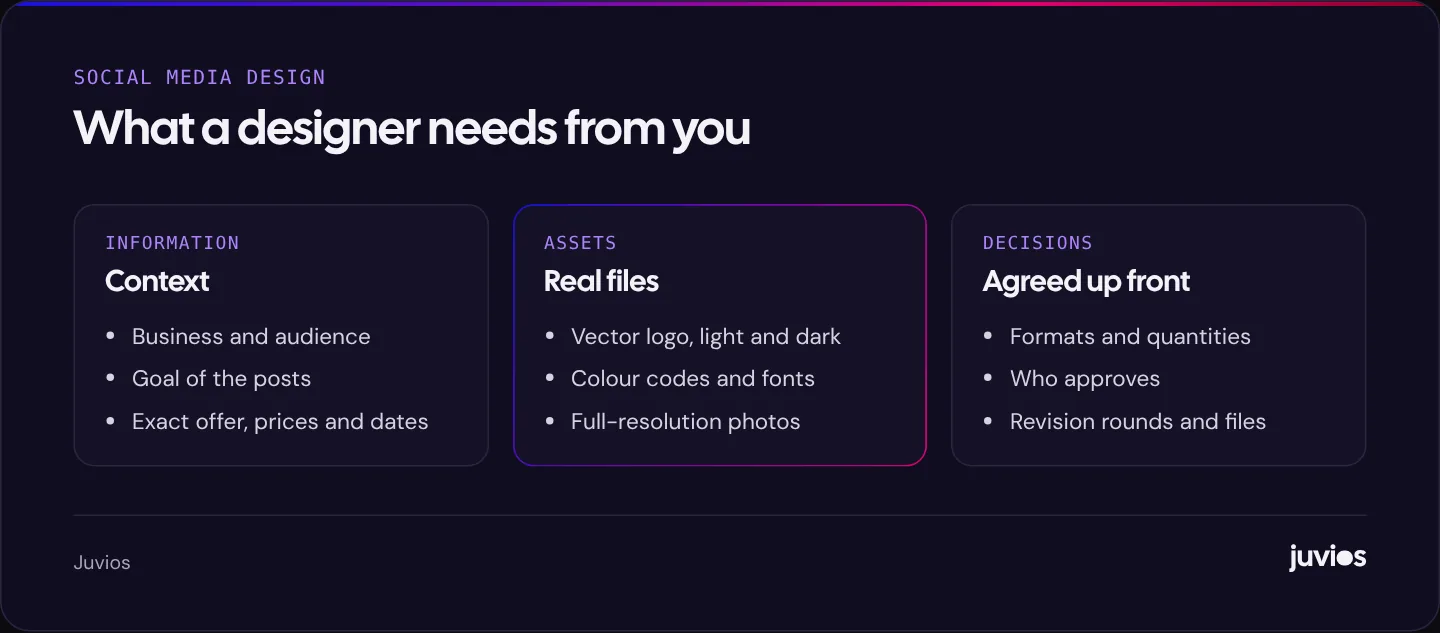
| Section | What to write | Example |
|---|---|---|
| About the business | One or two sentences on what you do and who for | Family bakery selling celebration cakes and bread to local customers |
| Audience | Who should respond to these posts | Parents planning birthdays, aged roughly 28 to 50, within 15 miles |
| Goal | What each post or set should achieve | Get cake orders for the next six weeks |
| Key messages | The facts and claims each post must include | Order 72 hours ahead; prices from the published menu; free local delivery over a set amount |
| Formats and quantity | Every deliverable, with sizes | 8 portrait feed posts, 8 matching story versions, 1 carousel of 5 slides |
| Copy | Who writes on-image text and captions | We supply captions; designer writes short on-image headlines for approval |
| Brand assets | Logo files, fonts, colours, photo library, style page | Link to shared folder and one-page style guide |
| Examples | Posts you like and dislike, and why | Like: clean close-ups; dislike: busy backgrounds |
| Timeline and approvals | Dates, who approves, how many revision rounds | Drafts by the 10th; one approver; two rounds |
| Files and usage | Files you need back and how you can use them | PNG and MP4 for posting; editable files as agreed |
 Tap to enlarge
Audience and goal: the two lines that shape everything
Audience and goal decide most design choices. A post meant to sell a time-limited offer to existing customers looks different from a post introducing the business to people who’ve never heard of it.
- Name a specific audience. “Everyone” leads to generic design. “Busy parents booking a child’s party” gives the designer something to aim at.
- Give one goal per post or set. Awareness, engagement, enquiries and sales pull design in different directions.
- Say whether posts will be used as ads. Ads reach people who don’t know you, so they often need a clearer offer, a stronger first impression and specific sizes.
If posts will run as Meta or TikTok ads, tell the designer how many versions you need for testing. Our guide to testing ad creative on Meta explains why two or three distinct concepts are more useful than many small variations.
Key messages and offer details
Give the designer every fact the posts must show, written exactly as it should appear. Designers shouldn’t have to work out prices, dates or terms from a long email thread.
- Offer: what it is, the price or saving, and the dates it runs.
- Conditions: minimum orders, areas covered, booking notice.
- Call to action: what you want people to do, such as call, message, book or visit.
- Required wording: legal lines, disclaimers or platform-required labels.
- Things to avoid: claims you can’t back up, competitor names, words your industry regulates.
Formats and quantities: list every deliverable
“Ten posts” can mean ten designs, or ten designs each in two or three sizes, or a mix of still posts, carousels and video covers. Spell it out.
| Deliverable | Shape | Quantity | Notes |
|---|---|---|---|
| Feed post | Portrait 4:5 | 8 | Main version of each post |
| Story or reel cover | Vertical 9:16 | 8 | Same design adapted; keep text away from top and bottom |
| Carousel | Portrait 4:5 | 1 × 5 slides | Tips post; first slide must work alone |
| Ad variants | 4:5 and 9:16 | 2 concepts × 2 sizes | For the cake order campaign |
Sizes and safe areas change over time, so link the designer to current specs. Our guide to social media image and video sizes keeps them in one place with links to each platform’s documentation.
Brand assets: give the designer the real files
Nothing slows design down like hunting for a logo in a screenshot. Put everything in one shared folder and link it in the brief.
- Logo in vector format (SVG, EPS or PDF) and high-resolution PNG with a transparent background, in light and dark versions.
- Brand colours with exact codes (HEX for screens) and the role each one plays.
- Font names, and font files or links if they aren’t free.
- Your one-page style guide, if you have one, or a few posts that show the look you want.
- Photos: original, full-resolution files, not images saved from social media or messaging apps, which are compressed.
- Past posts that represent the look you want to keep, and any templates already in use.
If you don’t have a style guide yet, it’s worth creating one before a large batch of work. How to build a consistent look for your social media explains what to include.
Examples: show what you mean
Words like “clean”, “bold” or “premium” mean different things to different people. Two or three examples make them concrete.
- Include posts you like from any business, not just competitors, and say what you like about each one: the colour, the layout, the photography or the tone.
- Include one or two you dislike and say why. This is often more useful than the likes.
- Point to your own best-performing posts and explain what made them work.
Screenshots are fine for examples, as long as you note where each came from. A short sentence under each, such as “like the amount of white space” or “too many fonts”, saves a long conversation later.
Examples are for direction, not copying. A good designer will use them to understand your taste and apply it to your brand.
Timeline, approvals and revision rounds
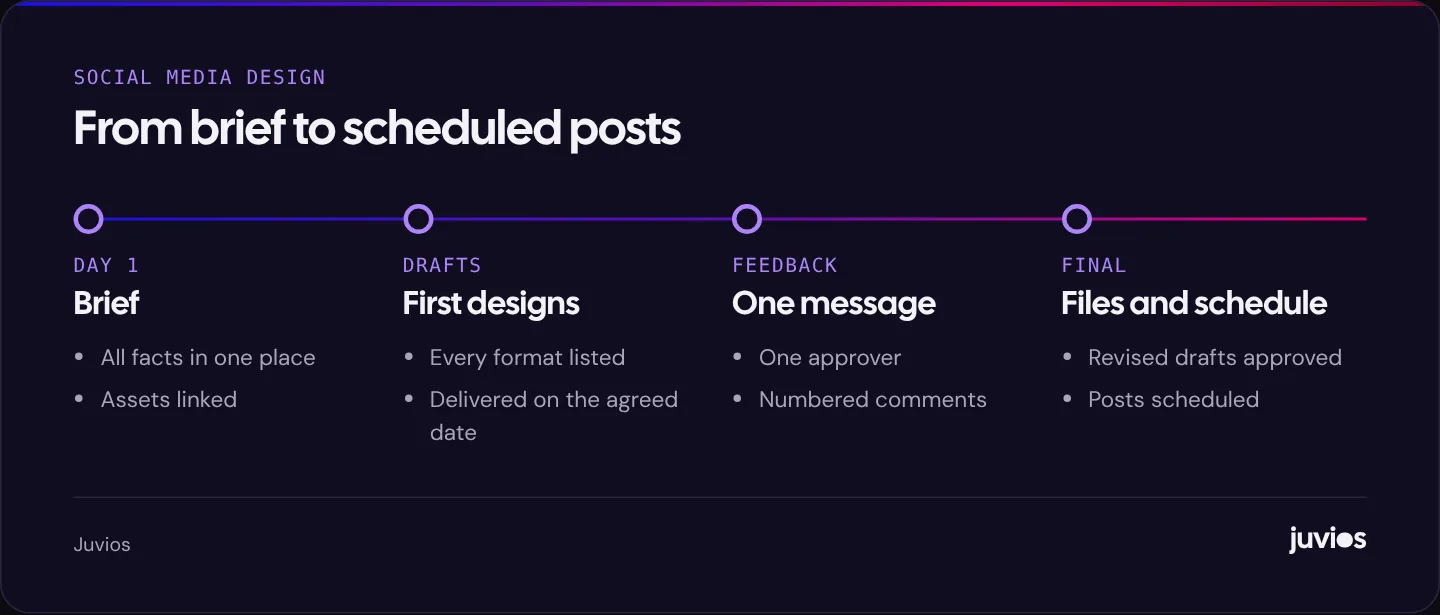
Agree how the work will flow before it starts. Most delays come from unclear approvals rather than slow design.
 Tap to enlarge
- Brief sent with all assets and facts.
- First drafts delivered on an agreed date.
- One person collects all feedback and sends it in a single message.
- Revised drafts delivered.
- Final approval, then files delivered or posts scheduled.
Agree the number of revision rounds included. Two is common. Changes that alter the brief itself, such as a new offer after drafts are done, usually count as new work, which is fair, because the designer is starting again.
How to give feedback that helps
Feedback is part of the brief, delivered later. The clearer it is, the fewer rounds you’ll need.
| Instead of | Try |
|---|---|
| “It doesn’t pop.” | “The headline gets lost on the photo. Can it be larger, or on a solid background?” |
| “Make it more premium.” | “Use more empty space and fewer elements, like the second example in the brief.” |
| “I don’t like the colours.” | “The green feels off-brand. Use the accent colour from the style guide instead.” |
| “Can we see some other options?” | “The layout works. Can we try a different photo that shows the cake whole?” |
Number your comments and refer to specific posts. Separate must-fix issues (a wrong price, a misspelled name) from preferences, so the designer can prioritise.
Files, editable versions and usage
Decide what you need back and how you can use it, before the work starts. For posting, you usually need high-quality PNG or JPG images and MP4 videos in the right sizes. Editable source files are a separate question: some designers include them, some charge for them, and some keep them. Neither approach is wrong, but it should be agreed in advance.
Ownership and licensing depend on your agreement and the law where you are. In the United States, for example, the US Copyright Office’s guide to works made for hire explains when a commissioning business owns the copyright and when it needs a written transfer. If ownership matters to you, put it in writing. Also ask about any stock images, fonts or music used: their licences may limit how you can reuse the designs.
Briefing a monthly retainer versus a one-off campaign
A one-off campaign brief covers a single goal, such as a launch or a sale. A monthly retainer needs a lighter brief each month, built on a fuller one written at the start.
- At the start: write the full brief once, covering the business, audience, brand assets, style guide, examples, approvals and files. This becomes the standing reference.
- Each month: send a short content plan listing the posts, their goals, the facts for each, and any offers or dates. Note what worked last month and what to change.
- Each quarter: review results and the style together. Retire post types that don’t work and adjust templates if needed.
A shared content calendar, even a simple spreadsheet with dates, post types, captions and status, makes the monthly brief almost automatic. The designer can see what’s coming and plan photography or video in advance.
A brief template you can copy
- Business: what we do, for whom, where.
- Audience for this batch: who should respond.
- Goal: what these posts should achieve, and whether any will be ads.
- Key messages: offer, price, dates, conditions, call to action, required wording.
- Deliverables: each format, size and quantity.
- Copy: who writes captions and on-image text.
- Assets: link to logo, fonts, colours, photos and style guide.
- Examples: likes and dislikes, with reasons.
- Timeline: draft date, feedback date, final date, posting dates.
- Approvals: who approves, how many revision rounds.
- Files and usage: formats needed back; editable files and licensing as agreed.
Filled-in example (hypothetical)
A dental clinic wants posts for a new teeth whitening service. Audience: adults in the city booking cosmetic treatments, mainly 25 to 45. Goal: consultation bookings; two posts will run as Meta ads. Key messages: whitening consultations available; price shown as listed on the clinic’s website; book online; required wording about individual results. Deliverables: six portrait posts, six matching stories, one five-slide carousel answering common questions, and two ad concepts in portrait and vertical. Copy: clinic supplies captions; designer proposes on-image headlines. Assets: shared folder with logo, fonts, brand colours, clinic photos and style page. Timeline: drafts in one week, feedback in two days, finals two days later. Approvals: practice manager only; two rounds.
Common briefing mistakes
- Sending facts in several emails or messages instead of one brief.
- Leaving prices or dates as “TBC” and changing them after drafts.
- Having several people send feedback separately, sometimes contradicting each other.
- Supplying compressed images saved from social media.
- Asking for “a few posts” without listing formats and sizes.
- Not saying the posts will be used as ads until after they’re finished.
- Skipping the examples, then rejecting drafts for reasons the designer couldn’t have known.
Common questions
How long should a social media design brief be?
Usually one or two pages. Long enough to cover the audience, goal, messages, deliverables, assets and approvals; short enough that the designer reads all of it.
Should I write the captions or the designer?
Either works, but decide in the brief. Many businesses supply captions and key facts, and ask the designer to write short on-image headlines for approval.
Do I own the designs I pay for?
It depends on your agreement and local law. Agree ownership, editable files and licensing in writing before the work starts.
Sources
- Meta Advertising Standards Meta Transparency Center
- Works Made for Hire (Circular 30) US Copyright Office
- Meta Ads Guide Meta
- TikTok auction in-feed ads specifications TikTok Ads Manager Help Centre