On this page · 16 sections
To know which marketing brings in enquiries, you need four things working together: tagged links so analytics can tell your campaigns apart, key events that count each completed enquiry, a record of where every enquiry came from (captured automatically where possible, and by asking where not), and a simple monthly sheet that follows enquiries through to customers. You don’t need expensive software. You do need consistency. This guide explains each part, how to set it up, and how to read the results without being misled by platforms that all claim the same customer.
Why the platforms’ numbers don’t add up
If you run Google Ads, Meta ads and a newsletter, and add up the conversions each one reports, the total is often higher than the enquiries you actually received. That’s not necessarily an error. Each platform counts conversions it was involved in, using its own rules about how long after a click or view it takes credit. A customer who saw a Facebook ad, then searched your name on Google and clicked an ad, may be counted by both.
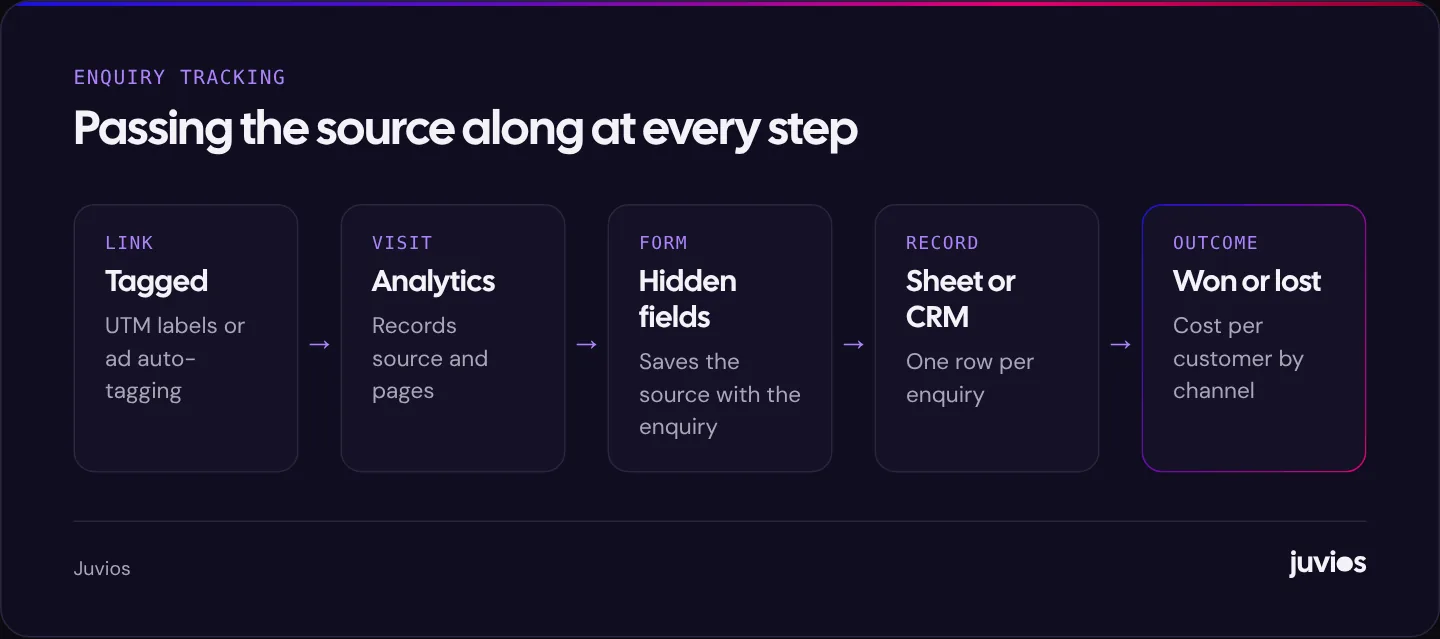
Platform reports are still useful for optimising campaigns inside each platform. But to decide where your money should go, you need a single record that counts each enquiry once. That record is your own list of enquiries, in a spreadsheet or CRM, with a source recorded for each one.
 Tap to enlarge
Start with your lead record
Your lead record is the source of truth. Every enquiry, from any route (form, phone, email, message, walk-in), gets a row. The columns that matter most are below.
| Field | Example | Why it matters |
|---|---|---|
| Date | 12 March | Trends and seasonality |
| How they contacted you | Website form, phone, WhatsApp, email | Shows which routes customers prefer |
| Source (channel) | Google Ads, Google organic, Meta ads, referral, repeat | The main question |
| Campaign or detail | Spring offer, boiler repair search | Which specific activity worked |
| Service | Boiler repair | Which services each channel brings |
| Quality | Good fit, poor fit, no response | Separates useful leads from noise |
| Outcome | Won, lost, pending | Turns enquiries into customers |
| Value | Job value or first order | Return on spend by channel |
Agree a fixed list of source values, just as with UTM tags, so “Google”, “google ads” and “Adwords” don’t all appear as separate entries. A dropdown in the spreadsheet or CRM enforces this. Decide too who fills in the record for phone and email enquiries, and when, because those are the ones most often missed.
A spreadsheet with these columns is enough for many small businesses. A CRM makes it easier as volume grows, especially if forms send leads into it automatically.
Tag your links so analytics can tell campaigns apart
UTM parameters are short labels added to the end of a link, telling analytics where a visit came from. Google Analytics says you should always use utm_source, utm_medium and utm_campaign when tagging a link.
| Parameter | Answers | Example values |
|---|---|---|
| utm_source | Which site or platform? | facebook, instagram, newsletter, tiktok |
| utm_medium | What type of traffic? | paid_social, email, organic_social, qr |
| utm_campaign | Which campaign? | spring_offer, boiler_service_autumn |
A tagged link looks like this: yoursite.com/offer. Use Google’s campaign URL builder if you prefer not to type them.
Rules that keep the data clean
- Write values in lower case and use the same spelling every time. Google Analytics treats values as case sensitive, so “Facebook” and “facebook” appear as two sources.
- Keep a shared list of the values you use, so everyone tags the same way.
- Tag links in ads, emails, social bios, QR codes and partner websites.
- Don’t tag links between pages on your own website. That overwrites the original source of the visit.
- Google Ads can tag links automatically through auto-tagging, so you usually don’t need manual UTMs there if analytics is linked.
Count enquiries as key events in analytics
In Google Analytics 4, actions that matter to your business are called key events. Set one up for each way people can enquire, so analytics can report enquiries by source, campaign and landing page.
- Form submission: count it when the submission succeeds, for example when a thank-you message or page appears, not when the button is clicked.
- Phone link taps: count taps on tap-to-call links. It’s not the same as a completed call, but it’s a useful signal.
- Booking completed: count the confirmation step of your booking tool, if it allows tracking.
- Messaging taps: count taps on WhatsApp or other messaging links, as a separate event.
Track phone calls if customers call
For many local businesses, most enquiries come by phone. If calls aren’t tracked, any channel that drives calls looks worse than it is.
| Method | What it tells you | Effort |
|---|---|---|
| Ask on every call | The caller’s own answer | Low; needs discipline |
| Separate numbers per channel | Calls from print, vehicles or a specific listing | Low to medium |
| Google Ads call tracking | Calls from ads and from your site after an ad click | Medium |
| Call tracking service with number swapping | Calls by source and campaign, including organic | Medium; monthly cost |
Recorded calls and caller details raise privacy obligations, which vary by country. Check the rules where you operate before switching on recording.
Ask “How did you hear about us?”
Asking is simple and catches what software misses: word of mouth, a van on the street, a podcast mention, a recommendation in a local group. Add the question to your form, as a short list of options plus “Other”, and ask it on the phone.
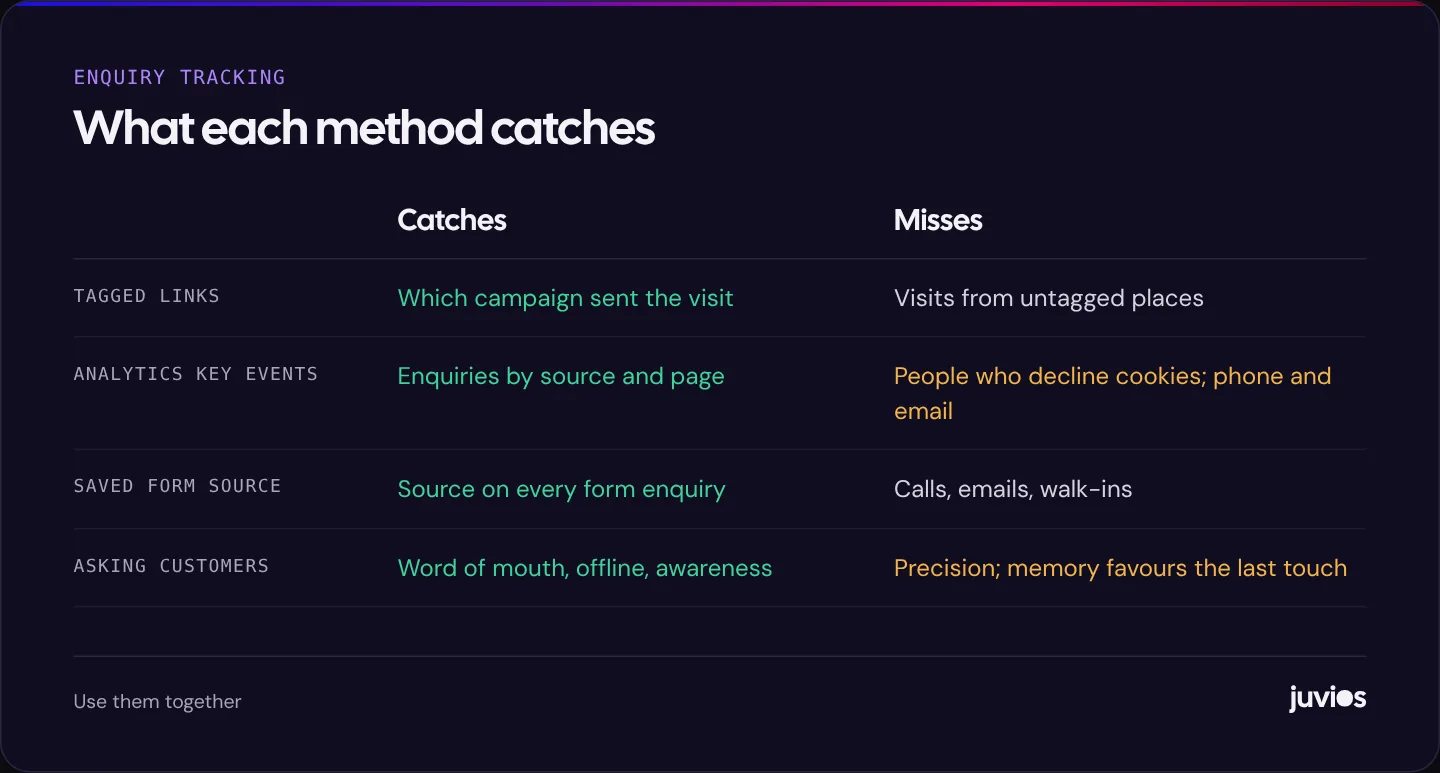
Self-reported answers have limits. People often name the last thing they remember, such as “Google”, when an Instagram ad first made them aware of you. Use the answers alongside tracked data, not instead of it. When the two disagree, that’s a useful clue that one channel is creating awareness and another is collecting the enquiry.
 Tap to enlarge
When the numbers surprise you
The first month of proper tracking often contradicts what everyone believed. A channel the team loved turns out to bring few customers; another nobody thought about brings many. Before acting, check the data.
- Look for set-up gaps: untagged links, forms without hidden fields, a key event that fires twice.
- Check volume: a handful of enquiries is too few to judge a channel. Wait for more data or combine several months.
- Look at both views: a channel with few last-touch enquiries may still be how people first heard of you, which the “How did you hear about us?” answers should show.
- Then act, gradually. Move part of the budget, not all of it, and see whether results follow.
Surprises are the point. Tracking that only confirms what you already believed hasn’t told you anything new.
Bring it together in a monthly report
Once a month, summarise your lead record by source. Keep it to one table.
| Source | Enquiries | Good fit | Customers | Spend | Cost per customer |
|---|---|---|---|---|---|
| Google Ads | 32 | 24 | 9 | US$1,100 | US$122 |
| Google organic and Maps | 18 | 15 | 6 | None (time and content) | No ad spend |
| Meta ads | 27 | 12 | 4 | US$600 | US$150 |
| Referrals and repeat | 9 | 9 | 6 | None | No ad spend |
| Other or unknown | 5 | 3 | 1 | None | No ad spend |
In this example, Google Ads brings the most customers, but referrals and organic search bring customers at no ad cost, which suggests asking happy customers for reviews and referrals deserves more effort. Meta brings plenty of enquiries but fewer good fits, which points to the ad and form rather than the channel itself.
Watch “unknown”. If it grows beyond a small share, something in the set-up is broken, such as a form without hidden fields or untagged links in a new campaign.
Use this table to set next month’s budget. Our guide to setting a small business marketing budget shows how to turn cost per customer into a budget decision.
A note on attribution: keep it simple
Attribution is the question of which marketing gets credit when a customer touched several. Large companies use complex models. For a small business, two simple views are usually enough.
- First touch: how did they first find you? Good for judging channels that create awareness, such as social ads and content.
- Last touch: what did they click right before enquiring? Good for judging channels that capture demand, such as search ads.
Your hidden form fields typically record the source of the visit that led to the enquiry, a last-touch view. The “How did you hear about us?” answer often reflects first touch. Looking at both together tells you more than either one alone.
Consent and privacy
Tracking must respect your visitors’ choices and the law where they are. In many countries, analytics and advertising cookies need consent. Use a consent tool that controls when tags load, keep your privacy policy up to date with what you collect and why, and only store the information you need.
For ad platforms specifically, our guides to Google Ads conversion tracking and the Meta Pixel and Conversions API cover consent settings in more detail.
A one-week set-up plan
- Day one: create the lead record with the columns above, and start logging every enquiry.
- Day two: add a “How did you hear about us?” question to forms and to your phone script.
- Day three: agree UTM naming, write it down, and tag every link in ads, emails, bios and QR codes.
- Day four: set up key events in analytics for forms, phone taps and bookings, and test each one.
- Day five: add hidden source fields to forms, and test with tagged links.
- After a month: produce your first monthly summary and fix anything that shows up as unknown.
Common mistakes
- Adding up platform-reported conversions and treating the total as real enquiries.
- Inconsistent UTM spelling, so one campaign appears as several sources.
- Tagging internal links, which overwrites where visitors really came from.
- Counting button clicks instead of successful submissions.
- Ignoring phone calls in a business that mostly gets calls.
- Never recording outcomes, so you know enquiries by channel but not customers.
Common questions
Do I need a CRM to track where enquiries come from?
No. A well-kept spreadsheet works for many small businesses. A CRM helps as volume grows, especially if forms send leads into it automatically with their source.
Why does Google Analytics show fewer enquiries than I received?
Some visitors decline analytics cookies, some enquire by phone or email without visiting a tracked page, and some forms aren’t tracked correctly. Your own lead record should be the final count.
Should I use UTM tags on Google Ads links?
Usually not needed. With auto-tagging on and Google Ads linked to analytics, visits from ads are identified automatically. Use UTMs on other platforms and emails.
Sources
- Collect campaign data with custom URLs Google Analytics Help
- About key events Google Analytics Help
- About conversion tracking Google Ads Help